
PostgreSQL 14 reaches community end of life on November 12, 2026. A database can keep serving queries after support ends, but the community will no longer maintain that major version. Treat the deadline as a reason to schedule a tested upgrade, with application compatibility and recovery decisions made before the maintenance window. This guide covers the inventory, target selection, migration methods, and cutover checks that belong in that plan.
- PostgreSQL 14 is still community-supported as of October 4, 2026. Its scheduled final release is November 12, 2026.
- A newer 14.x minor release does not move the major version's EOL date.
- Choose a supported target after checking extensions, drivers, operating systems, and provider availability.
- Rehearse the chosen method on an isolated restore. Measure the complete service interruption, including validation and reconnection.
- Define two separate rollback limits: whether the old data files are usable and whether new application writes can be recovered.
Scope and review date: October 4, 2026. Inventory SQL targets PostgreSQL 14; command examples use PostgreSQL 18 tools for self-managed installations. Examples are documentation-checked and have not been executed as a PostgreSQL 14-to-18 lab. Managed services require their provider's upgrade procedure.
When does PostgreSQL 14 reach end of life?
The PostgreSQL Global Development Group supports each major release for five years. Its current schedule lists November 12, 2026 as PostgreSQL 14's final release date. After that release, PostgreSQL 14 is unsupported by the community, including for future bug and security fixes. The server does not automatically stop on that date. See the official PostgreSQL versioning policy.
Keep three dates in your migration record: community EOL, your hosting provider's support deadline, and your approved production cutover. Give the cutover enough room for a failed rehearsal or a missing extension package. Using the EOL date itself as the maintenance date removes that margin.
Community EOL and managed-service support are separate
For example, Amazon RDS publishes its own standard-support calendar for PostgreSQL major and minor versions. Its listed dates are not the community EOL date. Check the exact engine and minor version you run, the provider's allowed upgrade targets, and any extended-support conditions in the Amazon RDS PostgreSQL release calendar. Apply the same provider-specific review to Aurora, Cloud SQL, and Azure Database for PostgreSQL.
Moving from one 14.x release to a newer 14.x release keeps the database on PostgreSQL 14. Continue minor maintenance while preparing the migration, but track the major-version change as a separate deliverable.
Inventory every PostgreSQL 14 dependency
Start with a fleet list from your deployment or cloud inventory. A SQL query reaches one connected server; it cannot discover every PostgreSQL instance in your organization. Include primaries, read replicas, standby clusters, development systems, reporting databases, disaster-recovery environments, and services that consume database changes.
Confirm the server version and cluster settings
Run this read-only query on each recorded endpoint. The result describes the connected server, which may be a replica if the endpoint routes reads.
SELECT current_setting('server_version') AS server_version,
       current_setting('server_version_num')::integer / 10000 AS major_version,
       current_database() AS database_name,
       pg_is_in_recovery() AS is_standby;

SHOW data_checksums;
SHOW shared_preload_libraries;
SHOW wal_level;
Interpretation: A major_version of 14 identifies an in-scope server. is_standby = true identifies a server in recovery. Record the checksum setting and preloaded libraries beside the operating system, package source, and cluster owner. A successful connection establishes reachability, not upgrade readiness.
Check extensions in every application database
SELECT extname, extversion
FROM pg_extension
ORDER BY extname;
This returns installed extension names and versions for the current database, as documented in the PostgreSQL 14 extension catalog. Repeat it in every application database. For each extension, record the target-compatible package, supported update path, and a test that exercises its objects or functions. A package available for PostgreSQL 14 does not establish PostgreSQL 18 compatibility.
Check application drivers, connection pools, ORMs, authentication, scheduled jobs, foreign data wrappers, and backup tooling separately. Include dependencies loaded through shared_preload_libraries; the extension query is not a complete inventory of executable modules or external services.
Record replication and CDC consumers
SELECT slot_name, slot_type, plugin, database,
       active, restart_lsn, confirmed_flush_lsn
FROM pg_replication_slots
ORDER BY slot_name;
The PostgreSQL 14 slot view lists physical and logical slots. A logical slot's confirmed_flush_lsn records its consumer's acknowledged position; physical slots have no value there. Assign an owner and reconnect or resnapshot procedure to each consumer. An empty result does not prove that there are no replicas, publications, subscriptions, or external consumers.
For a PostgreSQL 14 source, do not assume that a major upgrade preserves logical slots and subscription state. PostgreSQL 18's documented pg_upgrade support for migrating those objects requires an old cluster on version 17 or later. Plan the PostgreSQL 14 consumer transition explicitly. See logical replication upgrade requirements.
Choose the target version before choosing the maintenance window
Use PostgreSQL 18 as a candidate when your deployment supports it, then test compatibility. PostgreSQL 17 or 16 may fit a dependency that is not ready for 18. PostgreSQL 15 can be a bridge, but its shorter remaining support period creates another upgrade sooner.
| Target | Scheduled community final release | Decision to document |
|---|---|---|
| PostgreSQL 18 | November 14, 2030 | Can every required extension, driver, and deployment platform support it? |
| PostgreSQL 17 | November 8, 2029 | Does it remove a specific compatibility blocker to adopting 18? |
| PostgreSQL 16 | November 9, 2028 | Is the dependency constraint recorded, with a later upgrade planned? |
| PostgreSQL 15 | November 11, 2027 | Is a short-lived bridge justified by an identified constraint? |
Dates above come from the community version schedule, reviewed on October 4, 2026. PostgreSQL supports skipping intervening major versions, but compatibility review still includes their release notes. For a 14-to-18 change, review the migration sections for 15, 16, 17, and 18.
PostgreSQL 18 enables data checksums by default when initializing a cluster. pg_upgrade requires matching source and destination checksum settings. If PostgreSQL 14 has checksums disabled, account for that when initializing the empty destination; PostgreSQL 18 provides initdb --no-data-checksums. Do not change checksum settings on a running cluster to bypass a failed check. See the PostgreSQL 18 migration notes.
Compare the three upgrade methods
A PostgreSQL 14 data directory cannot be opened directly by PostgreSQL 18. Choose an actual major-version migration method: pg_upgrade, logical dump and restore, or logical replication. A physical backup remains important for restoring PostgreSQL 14, but copying its files into an 18 installation is not a major upgrade. See PostgreSQL's cluster upgrade guidance.
| Method | When to evaluate it | What the rehearsal must prove |
|---|---|---|
pg_upgrade | You control compatible old and new installations and can pause service. | Compatibility checks pass; file-transfer mode, disk capacity, validation, and replica recovery fit the window. |
| Dump and restore | You want a fresh target or must change the deployment layout. | Export, restore, indexes, privileges, statistics, and application checks fit the accepted interruption. |
| Logical replication | You need a parallel target and can operate a replication transition. | Data catches up; DDL, sequences, unsupported objects, consumers, and write fencing have explicit procedures. |
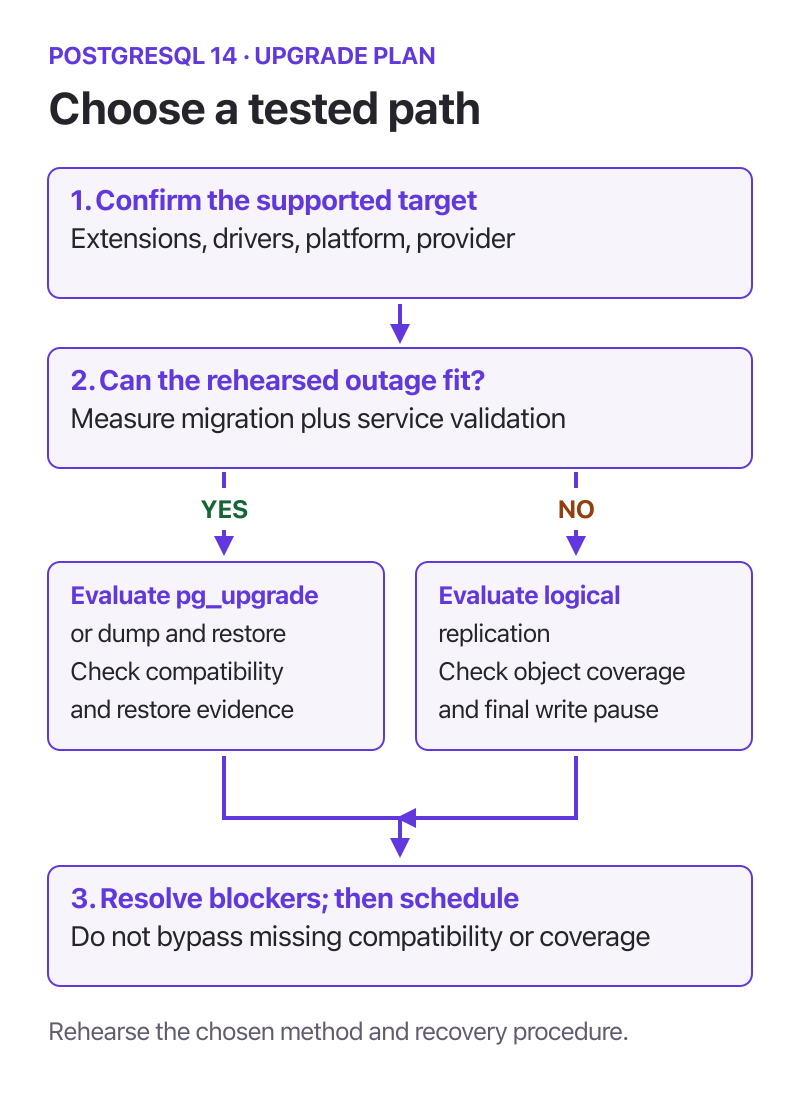
Choose a method from tested constraints. A smaller write interruption introduces additional replication and cutover work. Open the full-size decision diagram.
Option 1: Run a pg_upgrade compatibility check
Use the target version's pg_upgrade binary. Prepare an isolated PostgreSQL 14 restore and an empty PostgreSQL 18 cluster with compatible settings and target extension libraries installed. Run as the cluster's operating-system owner, from a writable working directory, with local authentication configured. The paths below are illustrative; both lab servers are stopped, and configuration files reside in their data directories.
/opt/postgresql/18/bin/pg_upgrade \
  --old-bindir=/opt/postgresql/14/bin \
  --new-bindir=/opt/postgresql/18/bin \
  --old-datadir=/srv/pg-lab/14 \
  --new-datadir=/srv/pg-lab/18 \
  --old-port=5414 \
  --new-port=5418 \
  --check
Interpretation: --check performs compatibility checks without migrating data. Resolve every reported blocker, then repeat. A passing check does not validate application behavior or measure the upgrade window. Follow the complete pg_upgrade procedure for the rehearsed migration.
Option 2: Rehearse a logical export and restore
Use PostgreSQL 18's export tools against the PostgreSQL 14 lab source. Configure a libpq service named pg14_lab for that source; its database is overridden to appdb in this example. Keep generated files in a restricted working directory.
umask 077
/opt/postgresql/18/bin/pg_dump \
  --dbname='service=pg14_lab dbname=appdb' \
  --format=custom \
  --file=appdb-pg14.dump

/opt/postgresql/18/bin/pg_dumpall \
  --dbname='service=pg14_lab dbname=appdb' \
  --globals-only \
  --file=cluster-globals.sql
Interpretation: The first command exports one database. The second captures global objects such as roles and tablespaces and may contain role password hashes. Inspect both commands' exit status and warnings. Use pg_restore for the custom archive and review the globals before restoring them into the isolated target. Provider-managed roles and tablespace paths may need a different mapping. See the official pg_dump and pg_dumpall references.
The export is not the acceptance test. Restore every required database, reconcile ownership and permissions, and run application tests. For production cutover, fence source writes before taking the final migration export unless a separately designed change-capture process carries subsequent changes. A consistent dump does not include writes committed after its snapshot.
Option 3: Build and validate a parallel logical target
Logical replication can carry changes between major versions while a target is prepared. Budget a final write pause for catch-up, reconciliation, and endpoint changes; derive its duration from your rehearsal. A replication connection being active does not prove that the target is ready to accept traffic.
Built-in logical replication does not replicate DDL, sequence state, or large objects. Maintain schema changes separately, reconcile sequences after source writes stop, and design another transfer for large objects if used. Check table coverage, replica identity for updates and deletes, initial synchronization, and replication errors against the documented restrictions. During the rehearsal, write a known marker transaction after fencing normal writers and verify its application on the target before opening target writes.
Rehearse recovery as well as the upgrade
Restore a recent backup into an isolated environment that cannot receive production traffic or trigger production jobs. Include tablespaces and required extension packages. Test with representative data volume and query patterns. A small schema-only trial can find compatibility problems, but it cannot establish production restore time or service interruption.
Capture timestamps for write fencing, final synchronization or export, migration, required rebuilds, validation, connection-pool restart, and successful application requests. Record available disk space and the largest unexpected delay. Use this evidence to approve a window rather than adopting an unsupported downtime estimate.
| Readiness item | Evidence to keep | Who confirms it |
|---|---|---|
| Target compatibility | Extension matrix, release-note actions, passing tool checks, and application test results. | Database and application owners. |
| Recovery | A completed PostgreSQL 14 restore, tested recovery steps, and an accepted recovery time. | Database and recovery owners. |
| Data validation | Critical-table comparisons and business invariants at the same frozen source boundary. | Application and data owners. |
| Service transition | Writer inventory, endpoint changes, pool reconnection, jobs, CDC, and replica checks. | Platform and integration owners. |
| Go or no-go | Measured rehearsal duration, failure criteria, rollback boundaries, and named decision owner. | Change approver. |
Use explicit gates during the production cutover
Adapt this sequence to the chosen method. Logical replication uses final catch-up; dump and restore uses a final export; pg_upgrade uses a stopped-cluster migration. Managed services replace those mechanics with provider operations. The decision gates remain useful across all three methods.
- Confirm readiness. Verify the approved target, backup restore evidence, change window, owners, and failure criteria.
- Fence PostgreSQL 14 writes. Stop application writers, jobs, and integration writers. Drain existing transactions and confirm that automatic failover cannot promote an old server into a competing writer.
- Complete the migration. Use the rehearsed procedure and capture logs. For logical replication, confirm initial synchronization and final applied changes, then reconcile sequences before proceeding.
- Validate before opening traffic. Complete required rebuilds, check critical data, roles, extensions, authentication, representative queries, and read-only application smoke tests.
- Open the target and observe. Route applications, recreate connections, resume approved jobs, and verify consumers and replicas. Keep PostgreSQL 14 fenced.
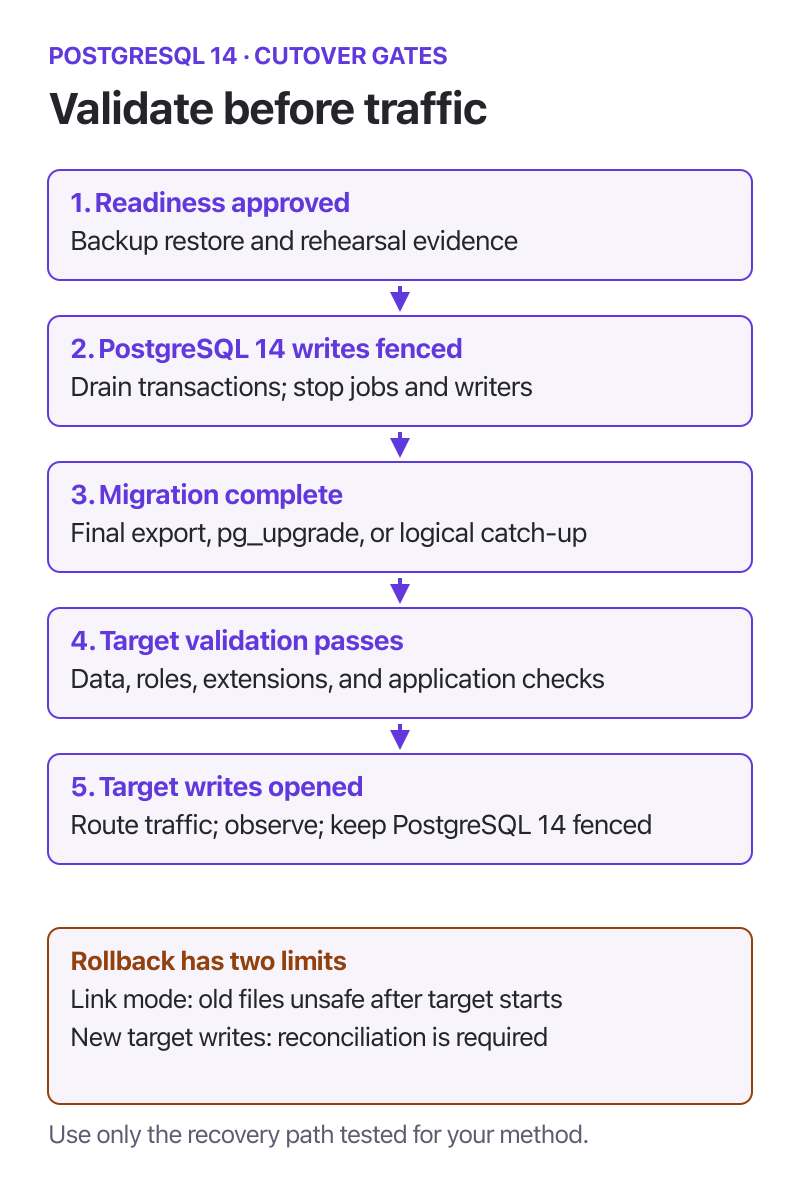
The final write boundary matters separately from file-level rollback. Link mode has an earlier boundary when the upgraded cluster starts. Open the full-size cutover diagram.
Explore the upgrade and rollback gates in an interactive animation. The five stages are illustrative, not measured migration timings.
Define rollback before target writes begin
With pg_upgrade copy mode, the old cluster's files remain separate. With link mode, starting the upgraded cluster writes shared files and makes the old cluster unsafe to restart; a backup restore is then required. See pg_upgrade's reverting instructions. Choose and rehearse the file mode before approving the change.
Even when old files remain usable, they do not contain writes committed only on the new target. After target writes begin, routing applications back to PostgreSQL 14 needs an explicit reconciliation or recovery plan with an accepted data-loss boundary. Otherwise, keep writers paused while deciding whether to repair the target or execute the approved recovery procedure. Do not run both environments as competing production writers.
Check the service after the version change
Run the version query from the inventory section on each application endpoint. Confirm it reaches the intended target and that the writable endpoint is not a standby. Compare database and extension inventories with the approved migration record.
After opening target writes, run the approved application write tests. Then check application errors, transaction latency, connection churn, query plans, replication health, CDC delivery, and scheduled jobs against the pre-upgrade baseline. Row counts alone do not verify permissions, sequence behavior, business invariants, or query performance. Use exact comparisons for critical datasets at the frozen boundary; budget their cost during rehearsal.
PostgreSQL 18 can retain optimizer statistics during pg_upgrade, so a blanket claim that all statistics are lost is outdated. Follow the tool's completion instructions for missing statistics and required rebuilds. For a logical restore, include statistics collection in the runbook. The PostgreSQL 18 release notes describe the statistics improvement; vacuumdb documents staged analysis and its operational limits.
Take and restore-test a backup of the upgraded system. Confirm retention and archive routing for the new cluster, and verify the standby and failover procedure. Retire the PostgreSQL 14 environment only after the agreed observation period and recovery acceptance.
Frequently asked questions
Will PostgreSQL 14 stop working on November 12, 2026?
No. Community EOL ends maintenance for that major version; it does not stop the server. A managed service can have separate support and operational policies, so check its engine-specific schedule.
Does installing the latest PostgreSQL 14 minor version solve EOL?
No. It patches PostgreSQL 14 while that branch is maintained. You still need a supported major-version destination.
Can I upgrade directly from PostgreSQL 14 to 18?
Yes, PostgreSQL supports skipping intervening major versions. Confirm deployment support and compatibility, read the intervening migration notes, and rehearse the chosen method. A provider can restrict direct upgrade targets.
Is a PostgreSQL 14 upgrade possible without downtime?
A parallel logical target can reduce the write interruption. Measure final catch-up, sequence reconciliation, validation, endpoint changes, and connection recovery for your workload before committing to a maintenance window.
Can I simply restart PostgreSQL 14 if the upgrade fails?
Only when the migration method leaves its files usable and the data recovery decision allows it. Link mode loses that file-level option after the upgraded cluster starts. New target writes create a separate reconciliation problem even with an intact old cluster.
Key takeaways
- Schedule the PostgreSQL 14 major upgrade before the November 12, 2026 community EOL date, with room for another rehearsal.
- Choose the target from tested compatibility and remaining support, then confirm your provider's allowed path.
- Inventory every database, extension, writer, replica, and CDC consumer; one server query is not a fleet inventory.
- Measure the complete cutover and test recovery using an isolated restore.
- Record file-level rollback limits and the new-write recovery boundary separately.
Plan your PostgreSQL 14 upgrade with JusDB
JusDB's PostgreSQL consulting can help assess dependencies, compare migration methods, and prepare a rehearsal and cutover runbook. Bring your version inventory, extension list, data volume, topology, and permitted maintenance window to the review. The service agreement records the scope, responsibilities, and acceptance criteria; your team approves production changes.
Discuss your PostgreSQL 14 upgrade plan.