Window functions are one of PostgreSQL's most powerful analytical tools, yet many developers reach for subqueries or application-level loops when a single OVER() clause would do the job in a fraction of the time. Unlike aggregate functions that collapse rows into a single result, window functions compute values across a set of rows while preserving every individual row in the output. They are the backbone of every analytics query that needs rankings, running totals, moving averages, or period-over-period comparisons — all in pure SQL, with no temporary tables required.
- Window functions use
OVER()to operate on a "window" of related rows without collapsing the result set — essential for analytics and reporting. - Ranking functions (
ROW_NUMBER,RANK,DENSE_RANK,NTILE) assign positional values within partitions. - Aggregate window functions (
SUM,AVG,COUNTwithOVER) power running totals, moving averages, and cumulative distributions. - Value functions (
LAG,LEAD,FIRST_VALUE,LAST_VALUE) access neighboring rows for period-over-period comparisons and boundary lookups. - Frame clauses (
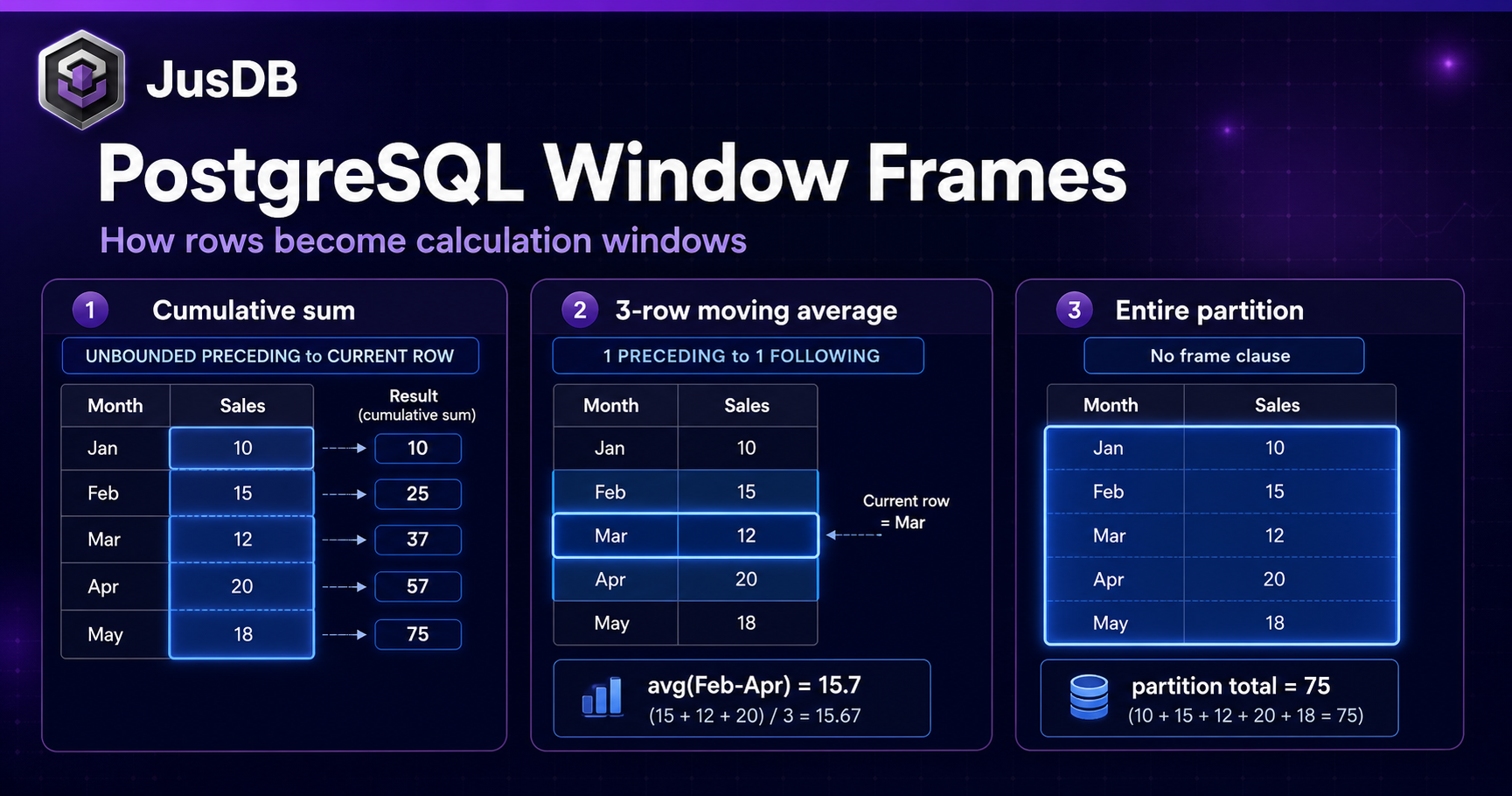
ROWS,RANGE,GROUPS) precisely control which rows fall inside the window — and choosing the wrong one is a common source of subtle bugs.
Window Function Syntax Explained
Every window function follows the same fundamental pattern. The function itself computes a value; the OVER clause defines the window of rows it operates on.
function_name(expression) OVER (
  [PARTITION BY partition_expression]
  [ORDER BY sort_expression [ASC|DESC]]
  [frame_clause]
)
The three components of the OVER clause each serve a distinct purpose:
- PARTITION BY — divides rows into independent groups (like
GROUP BYfor subsets). The window function resets at each partition boundary. Omitting it means the entire result set is one partition. - ORDER BY — determines the logical order of rows within a partition. Required for ranking functions and running totals; optional for pure aggregates like
SUM OVER ()to get a grand total. - frame_clause — specifies which rows relative to the current row are included in the window. Defaults to
RANGE BETWEEN UNBOUNDED PRECEDING AND CURRENT ROWwhenORDER BYis present, or all partition rows whenORDER BYis absent.
Window functions are evaluated after WHERE, GROUP BY, and HAVING, but before the final ORDER BY and LIMIT. This means you cannot filter on a window function result directly in a WHERE clause — a CTE or subquery is required.
Ranking Functions
Ranking functions assign an integer position to each row within its partition. They all require an ORDER BY inside OVER, and the differences between them matter when the data has ties.
ROW_NUMBER
ROW_NUMBER always assigns a unique sequential integer to every row, even when rows are otherwise identical. There are no ties — the order among equal rows is non-deterministic unless the ORDER BY is fully deterministic.
-- ROW_NUMBER: unique rank even for ties
SELECT
  employee_id, department, salary,
  ROW_NUMBER() OVER (PARTITION BY department ORDER BY salary DESC) AS dept_rank
FROM employees;
This query is ideal for "top-N per group" use cases. Every employee gets a unique rank within their department regardless of identical salaries, making it easy to filter WHERE dept_rank = 1 for the highest-paid employee per department.
RANK
RANK assigns the same rank to tied rows but then skips numbers, producing gaps in the sequence (1, 2, 2, 4). This mirrors how traditional contest rankings work.
-- RANK: gaps for ties (1,2,2,4)
SELECT
  product_id, category, revenue,
  RANK() OVER (PARTITION BY category ORDER BY revenue DESC) AS revenue_rank
FROM product_sales;
Use RANK when the concept of "second place" should account for the fact that two products tied for first — the next product genuinely occupies third place in the competition.
DENSE_RANK
DENSE_RANK also assigns the same rank to tied rows, but does not skip numbers (1, 2, 2, 3). It produces a dense sequence with no gaps.
-- DENSE_RANK: no gaps (1,2,2,3)
SELECT
  customer_id, total_orders,
  DENSE_RANK() OVER (ORDER BY total_orders DESC) AS customer_rank
FROM customers;
Choose DENSE_RANK when you need to paginate by rank tier — if you want "the second-tier customers", you can filter on rank 2 without worrying about gaps.
NTILE
NTILE(n) divides the ordered partition into n equal buckets and assigns each row a bucket number. It is the go-to function for quartile, decile, or percentile segmentation.
-- NTILE: divide into N buckets (quartiles)
SELECT
  order_id, order_value,
  NTILE(4) OVER (ORDER BY order_value) AS quartile
FROM orders;
Rows in quartile 1 represent the lowest 25% of order values; quartile 4 contains the top 25%. When the number of rows is not evenly divisible by n, PostgreSQL distributes the extra rows into the lower-numbered buckets.
Aggregate Window Functions
Standard aggregate functions — SUM, AVG, COUNT, MIN, MAX — become window functions the moment you append an OVER clause. They compute the aggregate over the defined window of rows without collapsing the result set.
Running Totals and Cumulative Sums
A running total accumulates values from the first row of the partition up to the current row. The explicit frame clause ROWS BETWEEN UNBOUNDED PRECEDING AND CURRENT ROW makes the intent unambiguous.
-- Running total of revenue by date
SELECT
  order_date,
  daily_revenue,
  SUM(daily_revenue) OVER (ORDER BY order_date
    ROWS BETWEEN UNBOUNDED PRECEDING AND CURRENT ROW
  ) AS running_total
FROM daily_sales;

-- Running total per region
SELECT
  region, order_date, revenue,
  SUM(revenue) OVER (
    PARTITION BY region
    ORDER BY order_date
    ROWS BETWEEN UNBOUNDED PRECEDING AND CURRENT ROW
  ) AS region_running_total
FROM regional_sales;
Adding PARTITION BY region resets the running total independently for each region, so each region's cumulative sum starts from zero at its first date.
Cumulative percentage is a powerful extension — it reveals the Pareto distribution of revenue across products:
-- Cumulative percentage
SELECT
  product_name, revenue,
  SUM(revenue) OVER (ORDER BY revenue DESC) AS cumulative_revenue,
  SUM(revenue) OVER () AS total_revenue,
  ROUND(100.0 * SUM(revenue) OVER (ORDER BY revenue DESC) / SUM(revenue) OVER(), 2) AS cumulative_pct
FROM products
ORDER BY revenue DESC;
The bare SUM(revenue) OVER () with no ORDER BY and no frame returns the grand total for every row — a clean way to avoid a separate subquery.
Moving Averages
Moving averages smooth out noise in time-series data by averaging a sliding window of surrounding rows. The frame clause defines the window width precisely.
-- 7-day and 30-day moving averages
SELECT
  date,
  daily_value,
  AVG(daily_value) OVER (
    ORDER BY date
    ROWS BETWEEN 6 PRECEDING AND CURRENT ROW
  ) AS moving_avg_7d,
  AVG(daily_value) OVER (
    ORDER BY date
    ROWS BETWEEN 29 PRECEDING AND CURRENT ROW
  ) AS moving_avg_30d
FROM time_series_data;
ROWS BETWEEN 6 PRECEDING AND CURRENT ROW includes the current row plus the 6 rows before it — exactly 7 rows total. For the first 6 rows where there are fewer than 6 predecessors, PostgreSQL automatically averages the available rows rather than returning NULL.
Cumulative Distribution
PostgreSQL provides two built-in functions for statistical distribution analysis. CUME_DIST() returns the cumulative distribution of the current row's value as a fraction between 0 and 1. PERCENT_RANK() returns the relative rank as a fraction, with the first row always at 0.
SELECT
  salary,
  CUME_DIST() OVER (ORDER BY salary) AS cumulative_dist,
  PERCENT_RANK() OVER (ORDER BY salary) AS percent_rank
FROM employees;
Value Functions
Value functions retrieve data from specific rows within the window — not the current row, but neighboring ones. They are indispensable for period-over-period comparisons, session analysis, and boundary lookups.
LAG and LEAD
LAG(expr, offset, default) looks backward by offset rows; LEAD(expr, offset, default) looks forward. Both accept an optional default value returned when there is no row at the requested offset.
-- Month-over-month revenue change
SELECT
  month,
  revenue,
  LAG(revenue, 1) OVER (ORDER BY month) AS prev_month_revenue,
  ROUND(100.0 * (revenue - LAG(revenue, 1) OVER (ORDER BY month))
    / NULLIF(LAG(revenue, 1) OVER (ORDER BY month), 0), 2) AS pct_change
FROM monthly_revenue;

-- LEAD: look ahead to the next event per user
SELECT
  event_id, user_id, event_time,
  LEAD(event_time, 1) OVER (PARTITION BY user_id ORDER BY event_time) AS next_event_time,
  LEAD(event_time, 1) OVER (PARTITION BY user_id ORDER BY event_time) - event_time AS time_to_next_event
FROM user_events;
The NULLIF(..., 0) guard in the percentage change calculation prevents division-by-zero errors for months where prior revenue was zero.
FIRST_VALUE, LAST_VALUE, and NTH_VALUE
FIRST_VALUE and LAST_VALUE return the value of an expression from the first or last row of the window frame. NTH_VALUE(expr, n) retrieves the value from the nth row of the frame.
-- First order date per customer
SELECT
  order_id, customer_id, order_date, order_value,
  FIRST_VALUE(order_date) OVER (
    PARTITION BY customer_id ORDER BY order_date
    ROWS BETWEEN UNBOUNDED PRECEDING AND UNBOUNDED FOLLOWING
  ) AS first_order_date
FROM orders;
LAST_VALUE behaves unexpectedly without an explicit frame clause. The default frame RANGE BETWEEN UNBOUNDED PRECEDING AND CURRENT ROW means LAST_VALUE returns the current row's value, not the partition's last. Always specify ROWS BETWEEN UNBOUNDED PRECEDING AND UNBOUNDED FOLLOWING when using LAST_VALUE.
Frame Clauses: ROWS vs RANGE vs GROUPS
The frame clause is the most nuanced part of window function syntax. PostgreSQL supports three frame modes, each defining "which rows are in the window" differently.
- ROWS — counts physical rows.
ROWS BETWEEN 2 PRECEDING AND CURRENT ROWalways includes exactly 3 rows (or fewer at the partition boundary). - RANGE — uses logical range based on the
ORDER BYvalue. All rows with the sameORDER BYvalue as the current row are treated as peers and included together. This is the default mode whenORDER BYis specified. - GROUPS (PostgreSQL 11+) — counts groups of equal
ORDER BYvalues rather than individual rows.
The difference between ROWS and RANGE manifests when there are ties in the ORDER BY column:
-- RANGE vs ROWS difference for running sum with ties
SELECT date, revenue,
  SUM(revenue) OVER (ORDER BY date ROWS BETWEEN UNBOUNDED PRECEDING AND CURRENT ROW) AS rows_sum,
  SUM(revenue) OVER (ORDER BY date RANGE BETWEEN UNBOUNDED PRECEDING AND CURRENT ROW) AS range_sum
FROM daily_sales;
-- RANGE sums all rows with the same date together
-- ROWS only sums up to the current physical row
If two rows share the same date, RANGE includes both in the window for each of them — meaning both rows get the same range_sum that already incorporates both. ROWS is strictly positional and will give different sums to those two rows. For running totals on data with potential date duplicates, ROWS is almost always the right choice because it produces intuitive, position-based accumulation.
For moving average calculations over a fixed number of prior days (calendar days, not row counts), RANGE is appropriate when you want RANGE BETWEEN INTERVAL '6 days' PRECEDING AND CURRENT ROW — but only numeric and date types support range offsets with non-default bounds.
Performance Considerations
Window functions are powerful but carry real performance implications that are worth understanding before deploying them in high-throughput production queries.
Execution order: Window functions run after WHERE, GROUP BY, and HAVING but before ORDER BY and LIMIT. The planner cannot push a window function result into an early filter, which is why you must wrap the query in a CTE or subquery to filter on window function output.
-- Good: CTE to filter after window function
WITH ranked AS (
  SELECT *, ROW_NUMBER() OVER (PARTITION BY dept ORDER BY salary DESC) AS rn
  FROM employees
)
SELECT * FROM ranked WHERE rn = 1;

-- Bad: Cannot use window function directly in WHERE
-- SELECT * FROM employees WHERE ROW_NUMBER() OVER (...) = 1; -- ERROR
Window reuse: When multiple window functions share the same OVER specification, PostgreSQL is smart enough to reuse a single window scan rather than sorting the data multiple times. However, even slightly different OVER clauses (different frame bounds, different ORDER BY directions) require separate passes. Consolidate window specifications where possible.
Indexing strategy: Window functions on large tables benefit significantly from indexes that cover both the PARTITION BY and ORDER BY columns. An index on (department, salary DESC) for the department-ranking query allows PostgreSQL to scan in index order without an explicit sort step, which can transform an O(n log n) sort into a fast index scan.
Run
EXPLAIN ANALYZE on queries with window functions to check for WindowAgg nodes. If you see sort operations immediately before a WindowAgg, adding an index on the PARTITION BY + ORDER BY columns can eliminate the sort step entirely, dramatically reducing query time on large datasets.
Memory pressure: Window functions that require sorting large partitions can spill to disk if work_mem is insufficient. For analytic workloads with heavy window function usage, increasing work_mem at the session level (SET work_mem = '256MB') can yield significant speedups by keeping sort operations in memory.
Avoid redundant re-computation: If you reference the same window function result multiple times in a query (for example, in both the SELECT list and a CASE expression), wrap the computation in a CTE or subquery. PostgreSQL may or may not deduplicate identical window function calls depending on the planner version and query structure.
Key Takeaways
- Window functions preserve individual rows while computing across related rows — use them instead of correlated subqueries or self-joins for any ranking, running total, or neighbor-row comparison.
- Choose the right ranking function:
ROW_NUMBERfor unique positions (top-N per group),RANKfor contest-style rankings with gaps,DENSE_RANKfor gapless tier-based rankings, andNTILEfor bucket segmentation. - Always specify an explicit frame clause with
LAST_VALUE, and preferROWSoverRANGEfor running totals on data with potential ties in theORDER BYcolumn. - Filter on window function results using a CTE or subquery — they cannot appear directly in
WHEREorHAVING. - Index the
PARTITION BY+ORDER BYcolumns and verify query plans withEXPLAIN ANALYZEto eliminate costly sort steps beforeWindowAggnodes. LAGandLEADeliminate the need for self-joins in period-over-period analysis;FIRST_VALUEandLAST_VALUEreplace correlated subqueries for boundary lookups.
Working with JusDB on PostgreSQL Analytics
Window functions unlock a category of analytical SQL that would otherwise require complex application logic or expensive intermediate tables. But writing performant analytic queries against large production datasets — and keeping them fast as data volumes grow — requires more than syntax knowledge. It demands deep familiarity with query planning, index design, partitioning strategies, and the interplay between PostgreSQL's executor and your schema.
At JusDB, our PostgreSQL specialists work alongside product and data engineering teams to design analytics-ready schemas, tune window-function-heavy reporting queries, and build the indexing infrastructure that keeps those queries fast at scale. Whether you are migrating an analytics workload from a legacy warehouse to PostgreSQL, tuning a slow dashboard query, or architecting a new time-series data model, we bring hands-on production experience to every engagement.
Explore our PostgreSQL services or contact us to discuss your specific analytics and reporting challenges.
Related reading: