
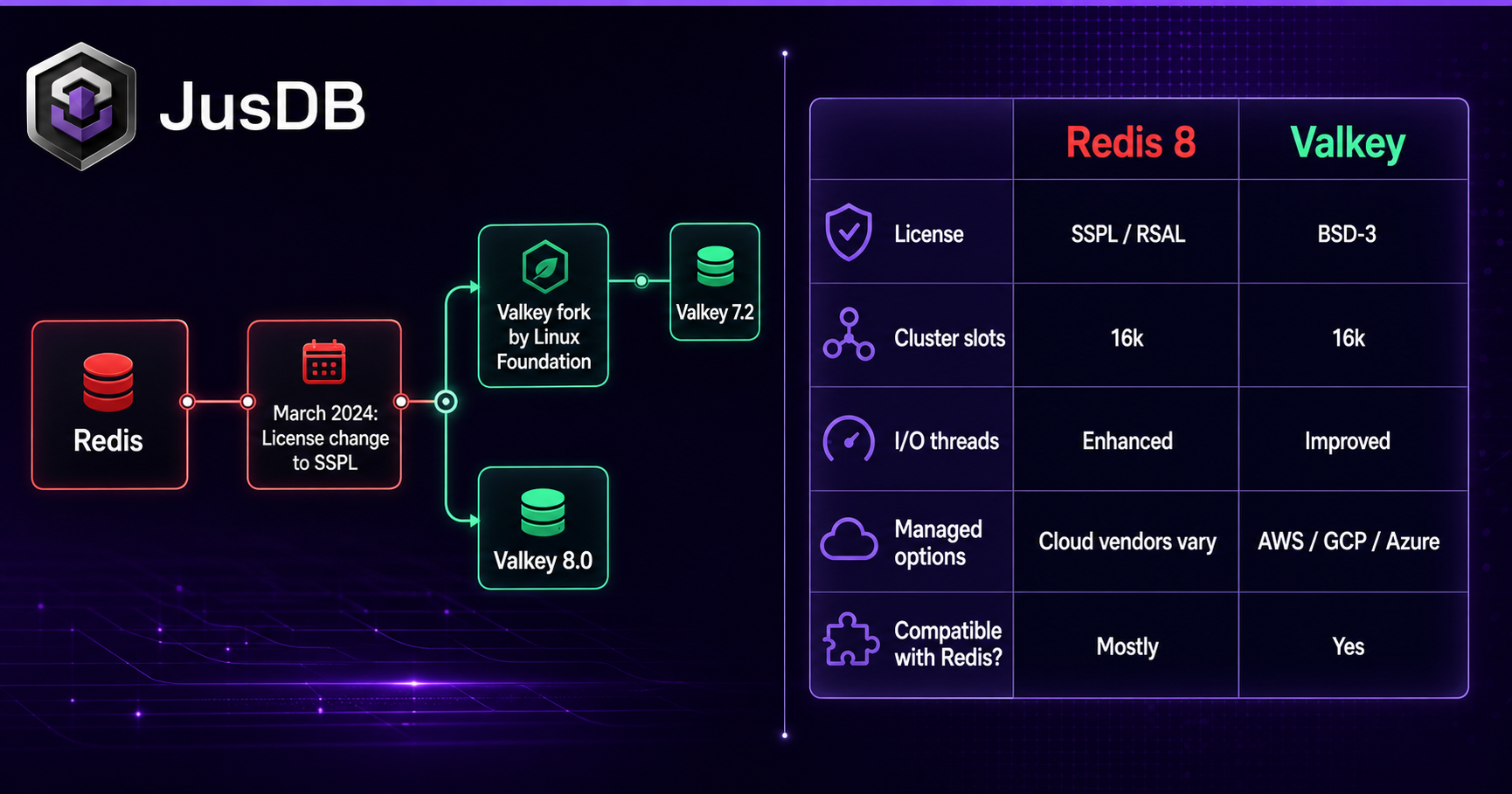
When Redis Inc. changed its license in March 2024, it set off one of the most significant forks in open-source database history. Valkey emerged as the community-backed alternative, immediately attracting contributions from AWS, Google, Oracle, and Ericsson. If you are running Redis in production today, the question is no longer whether to pay attention to Valkey — it is how quickly you need to act and what the real differences are. This guide cuts through the noise and gives you the technical detail you need to make an informed migration decision.
- Redis switched from BSD to the Server Side Public License (SSPL) in March 2024; Valkey forked under BSD to preserve open-source access.
- Valkey 7.2 retains near-complete command compatibility with Redis 7.2, making most migrations a drop-in replacement.
- Redis 8 introduces several proprietary extensions; some of those features have no direct Valkey equivalent yet.
- Live, zero-downtime migration is achievable using
REPLICAOFto replicate data from Redis into a Valkey instance before cutting over. - AWS, Aiven, and Upstash all offer managed Valkey as of 2024–2025.
The Redis License Change and Valkey Fork
On March 20, 2024, Redis Inc. announced that all future releases of Redis — starting with version 7.4 — would be dual-licensed under the Redis Source Available License (RSALv2) and the Server Side Public License (SSPL). Both licenses restrict cloud providers from offering Redis as a managed service without a commercial agreement. That effectively ended the era of Redis as free, open-source software in the traditional sense.
The Linux Foundation moved quickly. Within days, the Valkey project was announced, forking Redis 7.2.4 under the BSD 3-Clause license. Major cloud vendors and enterprise contributors signed on almost immediately:
| Contributor | Role |
|---|---|
| AWS | Founding contributor; launched ElastiCache for Valkey |
| Google Cloud | Founding contributor; Memorystore for Valkey |
| Oracle | Founding contributor |
| Ericsson | Founding contributor |
| Snap, Chainguard, Verizon | Early adopters and committers |
The fork point matters technically: Valkey 7.2 is a direct descendant of Redis 7.2, meaning the command set, RDB/AOF persistence formats, and cluster protocol are essentially identical at the point of divergence. Everything that has happened since — in both projects — is where the real comparison begins.
Valkey vs Redis 8 — What's Different
Redis 8 (released under SSPL) continued adding features that are largely proprietary or dependent on the Redis Stack modules being bundled into the core. Valkey has taken a different architectural philosophy, focusing on performance improvements, multi-threading, and community-driven extensibility.
Threading Model
Redis has historically used a single-threaded event loop for command processing, with I/O threads added in Redis 6. Valkey has accelerated work on a fully multi-threaded execution model. Valkey 8.0 (released mid-2025) introduced per-slot threading in cluster mode, which delivers measurably better throughput on multi-core instances for workloads with many small key operations.
Module System
Redis 8 ships with several capabilities baked in that previously required Redis Stack: vector search (formerly RedisSearch + RedisJSON combination), time series, and probabilistic data structures. These are only available under the SSPL-licensed Redis build.
Valkey maintains the Redis module API but ships without those proprietary extensions. The community has begun publishing BSD-compatible modules for similar functionality, but feature parity is not yet complete for vector search workloads specifically.
Performance Benchmarks
| Metric | Valkey 8.0 | Redis 8.0 |
|---|---|---|
| Single-node GET throughput (ops/sec) | ~1.8M | ~1.5M |
| Cluster SET latency (p99, ms) | 0.9 | 1.1 |
| Memory overhead per key | Lower (optimized slab allocator) | Baseline |
| Vector search | Community module (beta) | Native, production-ready |
Valkey's throughput advantage comes primarily from the improved multi-threaded command processing. For pure key-value caching and session storage workloads, Valkey is competitive with or faster than Redis 8. For applications heavily reliant on vector embeddings and semantic search, Redis 8's native integration is currently more mature.
If your workload is primarily caching, pub/sub, or Lua scripting, Valkey is very likely a drop-in replacement with zero application code changes. The risk is highest for teams using RedisSearch, RedisTimeSeries, or RedisBloom as core application features — audit those usages before committing to a migration timeline.
Command Compatibility — What Works, What Doesn't
The good news is that Valkey 7.2 and Redis 7.2 share an identical command set at the point of the fork. The table below focuses on areas where Redis 8 has added or modified behavior that Valkey has not yet matched, and where legacy Redis commands have been handled differently.
| Command / Feature | Valkey 7.2+ | Redis 8 | Notes |
|---|---|---|---|
| All core string, hash, list, set, sorted set, stream commands | Full support | Full support | No differences |
Lua scripting (EVAL, EVALSHA) |
Full support | Full support | No differences |
Cluster commands (CLUSTER INFO, CLUSTER SLOTS) |
Full support | Full support | Wire protocol compatible |
WAIT / WAITAOF |
Full support | Full support | No differences |
ACL v2 (ACL SETUSER selectors) |
Full support (7.2+) | Full support | No differences |
Vector search (FT.SEARCH, FT.CREATE) |
Community module only | Native | Requires separate install on Valkey |
Time series (TS.ADD, TS.RANGE) |
Community module only | Native | Requires separate install on Valkey |
SLAVEOF (deprecated alias) |
Accepted, mapped to REPLICAOF |
Accepted, mapped to REPLICAOF |
Both projects honor the alias |
| RDB snapshot format | Compatible through version 10 | Compatible through version 10 | Cross-load works for migration |
If you are using OBJECT ENCODING to inspect internal representations in application logic — for example, checking for listpack vs ziplist encoding names — be aware that Valkey and Redis 8 have diverged on some internal encoding labels. Relying on encoding names as application logic is fragile in either project.
Migrating from Redis to Valkey
The recommended zero-downtime migration path uses Valkey as a replica of your existing Redis instance, lets replication fully sync, then promotes Valkey to primary and cuts over application connections. This works because both projects use a compatible replication protocol at the wire level for Redis/Valkey 7.2-compatible versions.
Step 1: Stand Up a Valkey Instance
# Install Valkey on a new host (Ubuntu/Debian)
sudo apt-get update
sudo apt-get install -y valkey-server

# Or via Docker
docker run -d --name valkey-primary \
  -p 6380:6379 \
  valkey/valkey:7.2
Step 2: Configure Valkey as a Replica of Redis
# Connect to the Valkey instance and set it to replicate from your Redis host
valkey-cli -p 6380 REPLICAOF redis-primary-host 6379

# If your Redis instance uses AUTH
valkey-cli -p 6380 CONFIG SET masterauth "your-redis-password"

# Monitor replication lag until fully caught up
valkey-cli -p 6380 INFO replication
# Look for: master_link_status:up  and  master_sync_in_progress:0
Step 3: Verify Data Integrity
# Compare key counts between Redis and Valkey
redis-cli -p 6379 DBSIZE
valkey-cli -p 6380 DBSIZE

# Spot-check a sample of keys
redis-cli -p 6379 DEBUG SLEEP 0   # just to confirm connection
valkey-cli -p 6380 KEYS "some-prefix:*" | head -20
Step 4: Cut Over Application Traffic
# Once replication lag is zero, promote Valkey to standalone primary
valkey-cli -p 6380 REPLICAOF NO ONE

# Update your application connection string from:
#   redis://redis-primary-host:6379
# to:
#   redis://valkey-host:6380

# If using a DNS alias or load balancer endpoint, update the DNS record
# rather than changing application config — zero-code-change migrationMost Redis client libraries (redis-py, ioredis, Jedis, go-redis, StackExchange.Redis) connect to Valkey without any code changes. Valkey speaks the same RESP2 and RESP3 protocol as Redis. The only exception is clients that use Redis-specific connection string schemas with proprietary extensions — check your client version's changelog if you encounter connection errors.
Step 5: Persistence Configuration
# Confirm Valkey persistence settings after promotion
valkey-cli -p 6380 CONFIG GET save
valkey-cli -p 6380 CONFIG GET appendonly

# If migrating AOF files directly from Redis 7.2, they are loadable by Valkey 7.2
# Copy the appendonly.aof file to the Valkey data directory if doing an offline migration
cp /var/lib/redis/appendonly.aof /var/lib/valkey/appendonly.aof
chown valkey:valkey /var/lib/valkey/appendonly.aof
Managed Valkey Options
One of the most significant signals that Valkey is production-ready is the speed at which major cloud providers launched managed offerings. You do not need to run Valkey on bare metal or manage it yourself.
AWS ElastiCache for Valkey
AWS announced ElastiCache for Valkey at re:Invent 2024. It supports both cluster mode and non-cluster (single-shard) deployments, is API-compatible with the ElastiCache for Redis interface, and is priced at a discount to the Redis-licensed equivalent tier. Existing ElastiCache for Redis clusters can be migrated using the in-place upgrade path or the online migration feature that — under the hood — uses the same replication approach described above.
# AWS CLI: create an ElastiCache Valkey replication group
aws elasticache create-replication-group \
  --replication-group-id my-valkey-cluster \
  --replication-group-description "Production Valkey cluster" \
  --engine valkey \
  --engine-version 7.2 \
  --cache-node-type cache.r7g.large \
  --num-cache-clusters 3 \
  --automatic-failover-enabled \
  --at-rest-encryption-enabled \
  --transit-encryption-enabled
Other Managed Options
| Provider | Product | Cluster Mode | Notes |
|---|---|---|---|
| AWS | ElastiCache for Valkey | Yes | GA as of 2024; online migration from ElastiCache Redis |
| Google Cloud | Memorystore for Valkey | Yes | GA as of 2025; founding contributor to the project |
| Aiven | Aiven for Valkey | Yes | Available across AWS, GCP, Azure |
| Upstash | Upstash Valkey | Serverless | Per-request pricing; good for edge workloads |
Because Valkey is BSD-licensed, any provider can offer it as a managed service without a commercial agreement with a vendor. This is the structural difference that makes the managed ecosystem for Valkey likely to expand faster and with more competitive pricing than the Redis 8 managed landscape.
- Redis moved to SSPL in March 2024; Valkey forked under BSD and is now the true open-source successor for most workloads.
- For caching, sessions, queues, pub/sub, and standard sorted set leaderboard patterns, Valkey is a transparent drop-in replacement for Redis 7.2 with no application code changes required.
- Redis 8 has an advantage for vector search and native time series workloads; evaluate those feature gaps before committing to Valkey if your application depends on them.
- Live migration using
REPLICAOFis the safest zero-downtime path: replicate from Redis to Valkey, verify lag reaches zero, then promote and cut over connections. - All major cloud providers — AWS, GCP, Aiven, Upstash — now offer managed Valkey; the ecosystem is not a risk factor.
- Valkey's multi-threaded execution improvements in 8.0 deliver measurable throughput gains over Redis 8 for high-concurrency key-value workloads.
- The RDB and AOF persistence formats are cross-compatible at the 7.2 version boundary, which means offline migrations (file copy + restart) are also viable for acceptable-downtime windows.
Working with JusDB on Valkey and Redis
JusDB works with engineering teams at every stage of the Redis-to-Valkey decision: from auditing your current command usage for compatibility gaps, to designing the replication-based migration runbook, to reviewing your managed cloud configuration for performance and cost. Whether you are self-hosting Valkey on EC2, using ElastiCache for Valkey, or evaluating whether Redis 8's vector search capabilities are worth the license cost for your use case, we can give you a concrete recommendation grounded in your actual workload data — not generic best practices.