
Most teams building LLM applications start with a flat table, a JSON blob, or — worse — no persistent storage at all. That works until the first time a user says "you told me something different yesterday" and your system has no record of the conversation. The moment you add retrieval-augmented generation, multi-turn chat, A/B-tested prompts, and human feedback collection to the same product, an ad-hoc schema becomes a maintenance crisis. Getting the relational foundation right before you scale saves weeks of painful migrations. This post walks through every table you need, explains the trade-offs, and shows production-ready DDL you can drop straight into PostgreSQL.
- Model conversations and messages as separate entities with a role ENUM and per-message token counts.
- Store embedding metadata in a dedicated table that records model name, vector dimensions, and chunk provenance — not just the vectors themselves.
- Version every prompt template in a
prompt_versionstable so you can reproduce any response in your history. - Capture thumbs-up/down and free-text feedback in a structured feedback table to build a labelled RLHF dataset over time.
- Use JSONB liberally for application-specific metadata so new fields never require a migration.
Core Entities in an LLM Application
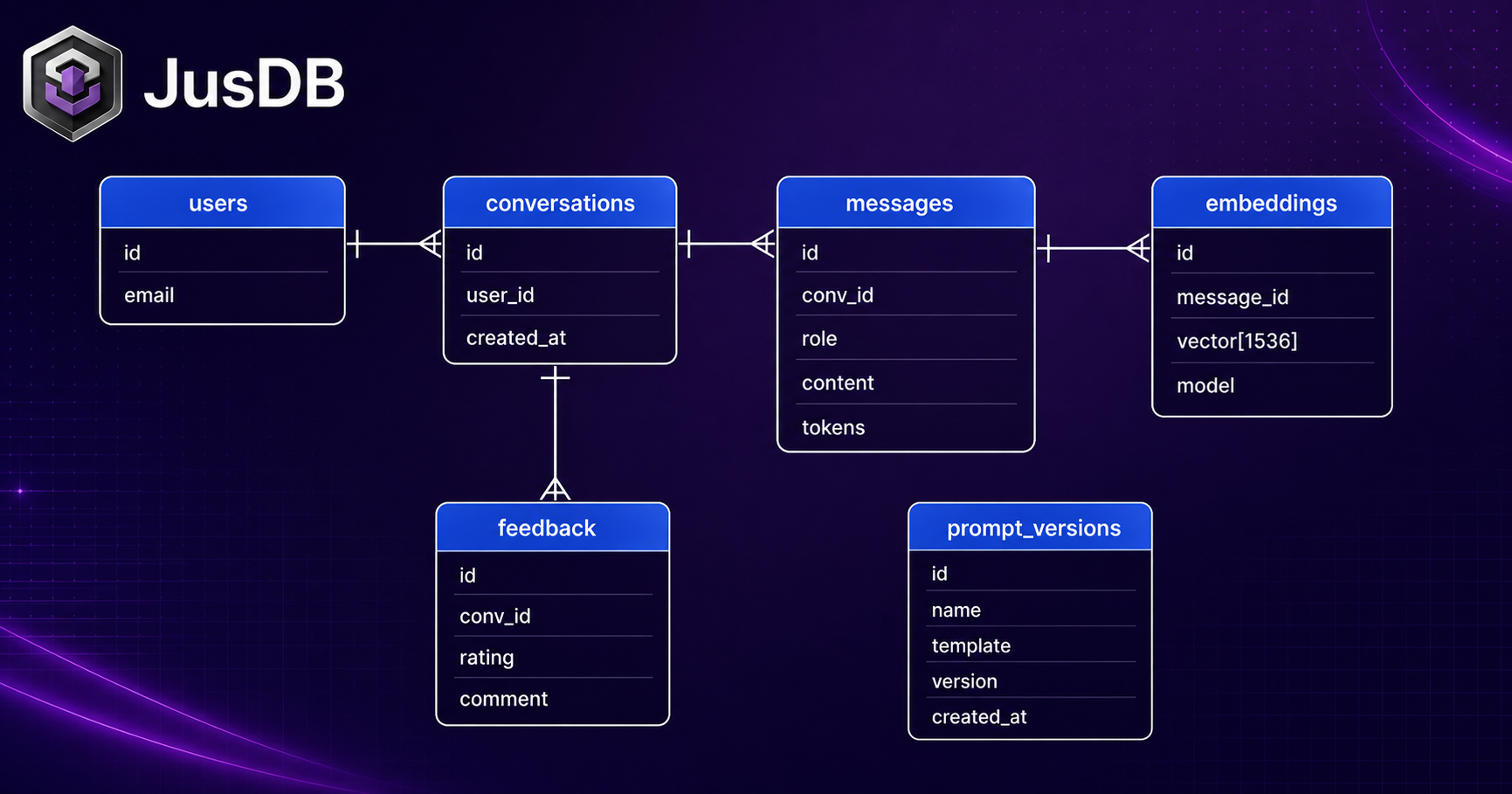
Before writing a single CREATE TABLE, map the domain. A production LLM application typically has six distinct conceptual entities: users, conversations, messages, documents and their embeddings, prompt templates, and human feedback. Each one deserves its own table, not a column in a monolithic "ai_events" log.
The relationship graph is straightforward: one user has many conversations; one conversation has many messages; each message may reference one or more embeddings that were retrieved before the LLM call; each message was generated using a specific prompt version; and one or more feedback records can be attached to any message. Keeping these normalized means you can answer operational questions — "which prompt version drives the best thumbs-up rate?" — with a simple JOIN rather than a full-table JSON scan.
Users already exist in most applications, so the schema below assumes a users table with a UUID primary key is handled by your auth layer. Every table here uses UUID DEFAULT gen_random_uuid() as the primary key for safe distributed inserts and forwards-compatible replication.
Enable the pgcrypto or pg_uuidv7 extension in PostgreSQL so that UUID primary keys sort chronologically. Monotonic UUIDs eliminate random B-tree page splits on high-write tables like messages.
Conversation and Message Storage
Conversations are the top-level session container. A conversation belongs to a user, carries a title, and accumulates total token usage over its lifetime. Denormalizing total_tokens at the conversation level avoids a costly aggregate query every time you render a usage dashboard.
CREATE TABLE conversations (
    id              UUID        PRIMARY KEY DEFAULT gen_random_uuid(),
    user_id         UUID        NOT NULL REFERENCES users(id) ON DELETE CASCADE,
    title           TEXT,
    total_tokens    INTEGER     NOT NULL DEFAULT 0,
    metadata        JSONB       NOT NULL DEFAULT '{}',
    created_at      TIMESTAMPTZ NOT NULL DEFAULT now(),
    updated_at      TIMESTAMPTZ NOT NULL DEFAULT now()
);

CREATE INDEX idx_conversations_user_id ON conversations(user_id);
CREATE INDEX idx_conversations_created_at ON conversations(created_at DESC);
Messages are the atomic unit of every interaction. The role column captures who produced the content: the human user, the assistant, or a system prompt injected by your application. Using a native ENUM rather than a free-text column enforces the OpenAI/Anthropic message format at the database layer, preventing rogue values that break SDK parsing.
CREATE TYPE message_role AS ENUM ('system', 'user', 'assistant', 'tool');

CREATE TABLE messages (
    id                  UUID            PRIMARY KEY DEFAULT gen_random_uuid(),
    conversation_id     UUID            NOT NULL REFERENCES conversations(id) ON DELETE CASCADE,
    role                message_role    NOT NULL,
    content             TEXT            NOT NULL,
    token_count         INTEGER,
    prompt_version_id   UUID            REFERENCES prompt_versions(id),
    model_name          TEXT,
    finish_reason       TEXT,
    latency_ms          INTEGER,
    metadata            JSONB           NOT NULL DEFAULT '{}',
    created_at          TIMESTAMPTZ     NOT NULL DEFAULT now()
);

CREATE INDEX idx_messages_conversation_id ON messages(conversation_id, created_at);
CREATE INDEX idx_messages_prompt_version  ON messages(prompt_version_id) WHERE prompt_version_id IS NOT NULL;
Storing token_count per message rather than only at the conversation level lets you run per-turn cost analysis and detect anomalously long responses — a practical early-warning signal for prompt injection attempts. The finish_reason field mirrors the model API response (stop, length, content_filter) and is essential for diagnosing truncated answers in production. latency_ms rounds out the observability picture by recording end-to-end response time at the row level, so a slow query on messages filtered by model_name immediately surfaces which model is underperforming.
Never store raw API keys, bearer tokens, or PII inside the metadata JSONB column. The flexible schema is convenient, but these columns are frequently exported to data warehouses or read replicas that have weaker access controls than your primary OLTP database.
Embedding Metadata Table
Vector databases (pgvector, Pinecone, Weaviate) handle the actual similarity search, but the metadata that describes each embedding lives most naturally in PostgreSQL alongside the rest of your relational data. A dedicated embeddings table records where each vector came from, which model produced it, and the exact text chunk it represents.
CREATE TABLE embeddings (
    id              UUID        PRIMARY KEY DEFAULT gen_random_uuid(),
    source_type     TEXT        NOT NULL,          -- 'document', 'message', 'faq_entry'
    source_id       UUID        NOT NULL,
    chunk_index     INTEGER     NOT NULL DEFAULT 0,
    chunk_text      TEXT        NOT NULL,
    model_name      TEXT        NOT NULL,          -- e.g. 'text-embedding-3-small'
    dimensions      INTEGER     NOT NULL,          -- e.g. 1536
    vector_store_id TEXT,                          -- external ID in pgvector / Pinecone
    token_count     INTEGER,
    metadata        JSONB       NOT NULL DEFAULT '{}',
    created_at      TIMESTAMPTZ NOT NULL DEFAULT now(),
    UNIQUE (source_type, source_id, chunk_index, model_name)
);

CREATE INDEX idx_embeddings_source ON embeddings(source_type, source_id);
CREATE INDEX idx_embeddings_model  ON embeddings(model_name);
The dimensions column is not redundant — different embedding models produce different vector sizes (1536 for text-embedding-3-small, 3072 for text-embedding-3-large), and mixing them in the same vector index produces silently wrong similarity scores. Recording dimensions here makes it trivial to write a nightly validation query that catches accidental model switches. The UNIQUE constraint on (source_type, source_id, chunk_index, model_name) guarantees idempotent re-embedding: running the ingestion pipeline twice will conflict-and-skip rather than duplicate rows.
Prompt Version Management
Prompt engineering is software development. Every change to a system prompt is a deployment, and deployments need version control. Storing prompt templates in code alone — a common shortcut — means you cannot join a historical message row back to the exact template that produced it. A prompt_versions table closes that gap.
CREATE TABLE prompt_versions (
    id              UUID        PRIMARY KEY DEFAULT gen_random_uuid(),
    name            TEXT        NOT NULL,          -- human-readable name, e.g. 'support-agent-v2'
    version         INTEGER     NOT NULL,
    template        TEXT        NOT NULL,          -- the full prompt template with {{variable}} slots
    variables       JSONB       NOT NULL DEFAULT '[]', -- JSON array of expected variable names
    model_name      TEXT,                          -- model this template was tuned for
    is_active       BOOLEAN     NOT NULL DEFAULT FALSE,
    notes           TEXT,
    metadata        JSONB       NOT NULL DEFAULT '{}',
    created_by      UUID        REFERENCES users(id),
    created_at      TIMESTAMPTZ NOT NULL DEFAULT now(),
    UNIQUE (name, version)
);

CREATE INDEX idx_prompt_versions_name_active ON prompt_versions(name, is_active) WHERE is_active = TRUE;
The partial index on (name, is_active) WHERE is_active = TRUE makes it extremely fast to fetch the current live template for a given prompt name — the hot path every time a user sends a message. The variables JSONB array documents which template slots exist, enabling a lightweight validation layer in your application before the LLM call. Set is_active = FALSE on old versions rather than deleting them; those rows are the audit trail that makes reproducibility possible months later.
Add a database trigger that enforces only one active version per name at a time. This prevents the race condition where two deployments briefly mark different versions as active simultaneously, causing non-deterministic prompt selection under load.
Feedback and Evaluation Storage
Human feedback is the raw material of RLHF (Reinforcement Learning from Human Feedback). Even if your team is not yet fine-tuning models, collecting structured feedback from day one means you have a labelled dataset ready the moment you need it. The schema below captures binary thumbs-up/down ratings, free-text explanations, and optional categorical tags — enough to support both automatic metrics dashboards and export to a fine-tuning pipeline.
CREATE TYPE feedback_rating AS ENUM ('thumbs_up', 'thumbs_down', 'neutral');

CREATE TABLE feedback (
    id              UUID            PRIMARY KEY DEFAULT gen_random_uuid(),
    message_id      UUID            NOT NULL REFERENCES messages(id) ON DELETE CASCADE,
    user_id         UUID            REFERENCES users(id) ON DELETE SET NULL,
    rating          feedback_rating NOT NULL,
    comment         TEXT,
    categories      TEXT[]          DEFAULT '{}',  -- e.g. ARRAY['hallucination','off-topic']
    correction      TEXT,                          -- what the ideal response would have been
    metadata        JSONB           NOT NULL DEFAULT '{}',
    created_at      TIMESTAMPTZ     NOT NULL DEFAULT now()
);

CREATE INDEX idx_feedback_message_id ON feedback(message_id);
CREATE INDEX idx_feedback_rating     ON feedback(rating);
CREATE INDEX idx_feedback_created_at ON feedback(created_at DESC);
The correction column is the most valuable field for RLHF dataset construction. When a user rates a response as thumbs-down and provides their preferred answer, that (prompt, bad_response, good_response) triple is a ready-made training example. The categories text array enables structured tagging without requiring a join to a separate taxonomy table — appropriate here because the tag vocabulary tends to be small and changes infrequently. For larger deployments, promote categories to a proper many-to-many relationship with a feedback_categories reference table.
To export a labelled dataset for fine-tuning, the following query collects all thumbs-down messages alongside their corrections and the prompt version used:
SELECT
    m.content                AS prompt_input,
    m.metadata->>'context'   AS retrieved_context,
    pv.template              AS system_prompt,
    m.content                AS bad_completion,
    f.correction             AS ideal_completion,
    f.categories,
    f.created_at
FROM feedback f
JOIN messages m      ON m.id = f.message_id
LEFT JOIN prompt_versions pv ON pv.id = m.prompt_version_id
WHERE f.rating = 'thumbs_down'
  AND f.correction IS NOT NULL
ORDER BY f.created_at DESC;Before exporting feedback data to any external fine-tuning service, apply your data retention and privacy policy. A user's free-text correction in the correction column may contain personally identifiable information that must be redacted or pseudonymized under GDPR or CCPA before it leaves your PostgreSQL instance.
- Normalize LLM application data into six tables — users, conversations, messages, embeddings, prompt_versions, and feedback — rather than logging everything into a single events table.
- Use a
message_roleENUM to enforce the system/user/assistant/tool taxonomy at the database layer; storetoken_countandlatency_msper message for cost and performance observability. - The
embeddingstable records model name and vector dimensions alongside chunk provenance, making it safe to run multiple embedding models in parallel without cross-contaminating vector indexes. - Treat prompt templates as versioned, immutable rows; use a partial index on the active version for fast hot-path lookups and a database trigger to prevent dual-active race conditions.
- The
feedbacktable'scorrectioncolumn produces (bad, good) training pairs automatically as users interact with the product — building your RLHF dataset at zero incremental engineering cost. - JSONB
metadatacolumns on every table absorb application-specific fields gracefully, deferring schema migrations until a field is truly load-bearing and worth indexing.
Working with JusDB on AI Application Databases
Designing a schema that keeps pace with a fast-moving LLM product requires more than good SQL — it requires experienced judgment about when to normalize further, which JSONB fields to promote to columns, how to partition the messages table as it crosses hundreds of millions of rows, and how to tune autovacuum for the write-heavy feedback pipeline. JusDB specializes in exactly these decisions, working with engineering teams from initial schema design through production-scale optimization.